
Visibility on the road, trail or parking lot can help make the difference between a moment you’d rather forget and a story you’re ready to share.
When equipped, the 360-Degree Camera system provides a clear view of the environment around your Ford vehicle with the help of cameras on the front, sides and rear.* It works by stitching together images from each camera and displaying them on your SYNC® Technology** touchscreen:
Achieving a 360-degree view demands precise synchronicity between four cameras located around your vehicle.
Press the button beneath your vehicle’s touchscreen to bring up the camera view.
Simply press the button located on your vehicle’s touchscreen. The three most often used views are:
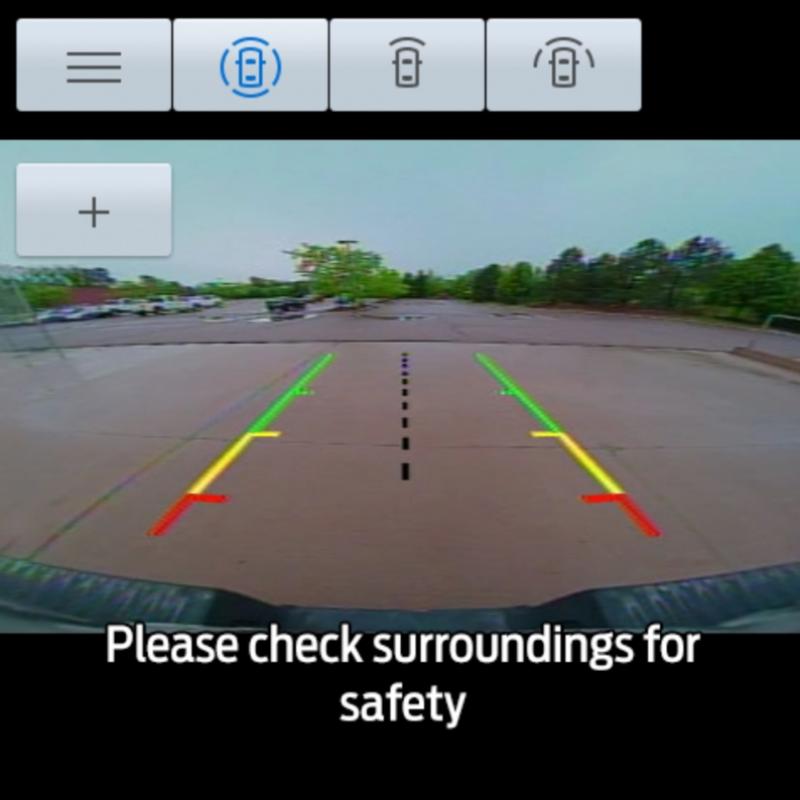
Active guide lines have been developed to help make sure you are aware of where objects such as curbs, garage doors and poles are while you are in Reverse. The types of guide lines are:
Active guide lines only show with fixed guide lines. Turn the steering wheel to point the guide lines toward an intended path. If the steering wheel position changes when reversing, your vehicle could deviate from the intended path.
The fixed and active guide lines fade in and out depending on the steering wheel position. The active guide lines do not display when the steering wheel position is straight.
Objects in the red zone are closest to your vehicle and objects in the green zone are farther away. Objects get closer to your vehicle as they move from the green zone to the yellow or red zones. Use the sideview mirrors and rearview mirror to get better coverage on both sides and rear of your vehicle.
If you need to turn off your camera system, there is a tactile button located under the touchscreen on the far left.
See your vehicle’s Owner’s Manual for more information about the 360-Degree Camera system.
*Driver-assist features are supplemental and do not replace the driver’s attention, judgment and need to control the vehicle. It does not replace safe driving. See your Owner’s Manual for details and limitations.
**Don’t drive while distracted or while using handheld devices. Use voice-operated systems when possible. Some features may be locked out while the vehicle is in gear. Not all features are compatible with all phones.
Did we answer your question?
Get support from Ford AI