
Depending on your vehicle's software version, BlueCruise* allows a driver to use the turn signal switch to indicate a desired lane change or perform an automatic lane change without a turn signal initiated when equipped. In all versions, you must remain alert, keep your eyes on the road, and be prepared to take over the steering.
BlueCruise is Ford’s eyes-on, hands-free highway driving technology. With new versions of software, we have added enhancements to the system to help make long trips and daily commutes easier and more enjoyable.
Even with these enhancements, it is important to remember that BlueCruise is a Level 2 driver assistance system, meaning that, as the driver, you must remain alert and actively participate and be prepared to take over and resume control at any time. As with any lane change, check your blind spots and the speed and distance from other vehicles on the road. It is not an autonomous or crash-avoidance system.
Depending on the software in your vehicle, there are several ways you can make a lane change while using BlueCruise.
To learn more about the lane change feature in your vehicle, select your BlueCruise version from the drop-down options below.
Lane Change Assist and Automatic Lane Change are available on select BlueCruise vehicles. Not sure which version or features your vehicle has?
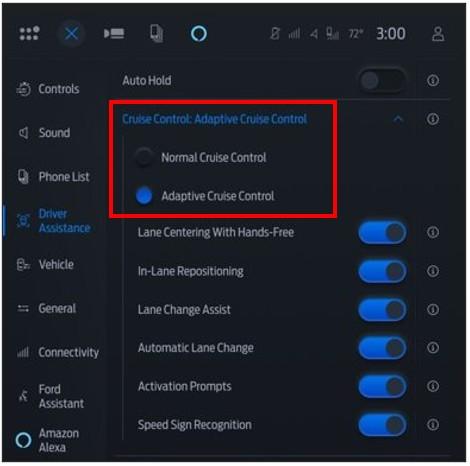
You can check which lane change features are available in your settings screen by navigating to the Driver Assistance Menu > Adaptive Cruise Control > Lane Centering with Hands-Free.
The settings will show if you have Lane Change Assist and/or Automatic Lane Change equipped on your vehicle.
You may also check the How do I know which version of BlueCruise is available for my vehicle? article to see what version is available via an over-the-air software update.
What is BlueCruise?How do I use BlueCruise?
*Available feature on select vehicles. BlueCruise requires an active plan or trial — see ford.com/bluecruise for details. Terms apply. BlueCruise is a driver-assist feature and does not replace safe driving or driver’s attention, judgment or need to control the vehicle. Only remove hands in a Hands-Free Blue Zone. Always watch the road and be prepared to resume control. See Owner’s Manual for details and limitations.
Did we answer your question?
Get support from Ford AI