
Off road, on road and at all points in between, keeping your devices charged and connected to the world at large may never be a concern in Ford Bronco™ Sport.
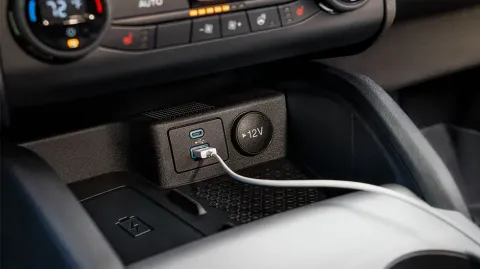
That's because Bronco Sport delivers several different charging options, including an available wireless charging pad, USB-A port, USB-C port for driver, front-seat passenger and, on later versions, rear-seat passengers. There are even 12V and available 110V* power outlets that not only charge small devices, they may be able to power larger items as well.
*400W of total power on Bronco Sport Badlands™ or 150W on Bronco Sport Outer Banks.™
12V power outlets are in the following locations:
110V power outlets, when equipped, are in the following locations:
When it comes to electricity, you can never be too careful. Here are some tips to ensure that you use the power outlets in your Ford Bronco safely:
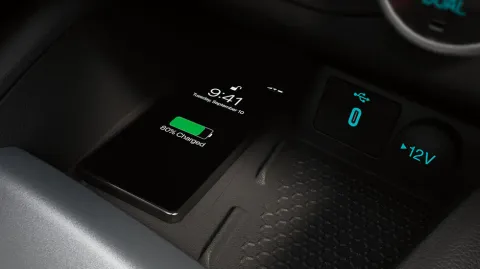
As wireless charging becomes the norm, Bronco Sport delivers with an available compatible Qi charging pad in select modes and packages.** The charger is located on the center console or, in some cases, in your media bin below the instrument panel.
**Wireless charging: Equipped on Bronco Sport Big Bend,™ Bronco Sport Outer Banks, Bronco Sport Badlands and Bronco Sport First Edition.
To charge a wireless device, place it on the center of the Qi†charging surface with the charging side down. The charging stops after your device reaches a full charge.
The wireless charger may be used when the vehicle is in Accessory mode, when the vehicle is running or when your SYNC®†† 3 is on.
†Available Qi wireless charging may not be compatible with all mobile phones.
††Don’t drive while distracted or while using handheld devices. Use voice-operated systems when possible. Some features may be locked out while the vehicle is in gear. Not all features are compatible with all phones.
Qi wireless charging standard is controlled by the Wireless Power Consortium.
Tips for wireless charging:
Did we answer your question?
Get support from Ford AI