
Auto Start-Stop Technology (if equipped)* can help reduce fuel consumption and vehicle emissions by stopping the engine when it is idling (e.g., at traffic lights).
When you apply the brakes and come to a complete stop, your engine automatically shuts off. A light on the instrument cluster will indicate the engine is off. Your vehicle automatically restarts immediately once you take your foot off the brake pedal.
Notes:
Watch the video below to learn more about using this feature.
Auto Start-Stop can be temporarily disabled. This is not a permanent change; you will have to deactivate it each time you start your vehicle.
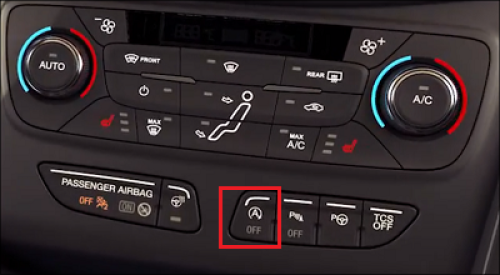
To turn the system off, press the Auto Start-Stop Off button on your instrument cluster.
Note: Button placement may vary by vehicle model and year. Refer to your Owner's Manual for information specific to your vehicle.
Why does my vehicle enter Deep Sleep mode?
*Feature is available on select vehicles. Features may vary based on model year, trim, options, packages, and supply availability. Use the Build and Price tool to view feature availability on current models. If you have questions or need more information, reference your Owner’s Manual or contact your Ford Dealer. Auto Start-Stop may not shut your engine off if your vehicle battery is charging, the engine is still warming up, or if you are using heat or air conditioning.
Did we answer your question?
Get support from Ford AI